
 By admin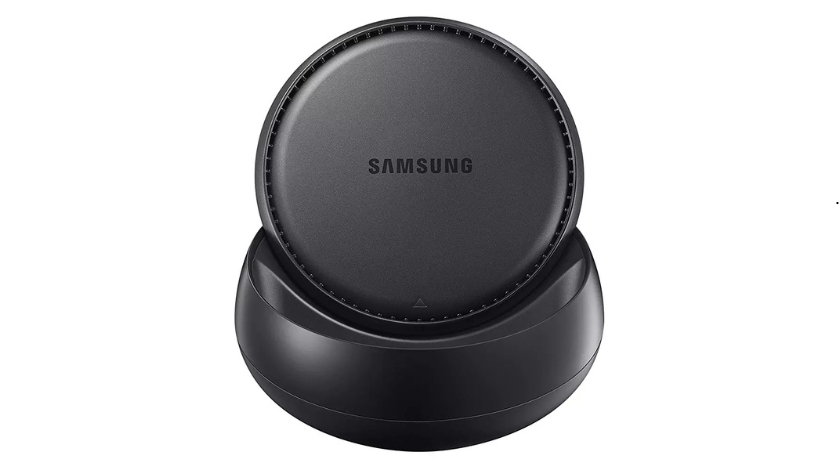
A Samsung docking station is an accessory that allows a compatible Galaxy smartphone or tablet to connect to external displays, keyboards, mice, Ethernet networks, USB storage devices, and other peripherals. Instead of viewing Android on a small phone screen, users are presented with Samsung DeX, a desktop-style interface that resembles a traditional Windows or macOS workspace. Windows can be resized, multiple apps can run simultaneously, and common productivity tasks such as document editing, web browsing, and video conferencing become much more comfortable on a larger display.
Samsung’s original DeX Station and DeX Pad were purpose-built accessories for this experience. Over time, Samsung expanded support so that many compatible USB-C-to-HDMI adapters and multiport hubs could also launch DeX, making the ecosystem far more flexible. Today, many users choose compact USB-C docking stations that provide HDMI output, USB ports, SD card readers, Gigabit Ethernet, and USB Power Delivery while remaining portable enough for travel. Samsung also supports wireless DeX on compatible TVs and monitors, though wired docks still offer lower latency, higher stability, and access to additional accessories.
Understanding Samsung DeX
Samsung DeX is the software that powers the desktop experience. Once connected to an external display, the phone automatically launches a taskbar, desktop shortcuts, application windows, and familiar keyboard and mouse controls. Rather than replacing Android, DeX extends it into a more productive environment where multitasking feels natural. Users can drag windows, copy and paste between applications, and continue using their phone independently while work continues on the monitor.
Samsung has continued improving DeX with newer Galaxy devices. Recent Galaxy smartphones introduce smoother multitasking, faster application switching, and expanded desktop capabilities. Samsung also emphasizes wireless DeX support for presentations and collaborative work, reducing the need for dedicated hardware when portability matters most.
Types of Samsung Docking Stations
Samsung users can choose from several docking solutions depending on their workflow.
| Dock Type | Best For | Main Advantage |
|---|---|---|
| Samsung DeX Station | Office desk | Official Samsung accessory with cooling |
| Samsung DeX Pad | Portable productivity | Phone doubles as touchpad |
| USB-C Hub | Everyday users | Affordable and compact |
| Universal USB-C Dock | Professional workstation | Multiple displays and many USB ports |
The original Samsung DeX Station includes USB ports, HDMI output, Ethernet, USB-C charging, and an internal cooling fan. Although it is an older product, Samsung continues listing it among supported DeX accessories for compatible Galaxy devices.
The DeX Pad allows the phone to lie flat, turning its screen into a touchpad while connected to an external monitor. This design is especially useful when a mouse is unavailable.
USB-C hubs have become the most popular choice because they are smaller, less expensive, and compatible with laptops, tablets, and phones in addition to Samsung Galaxy devices.
Compatibility
Compatibility remains one of the most important buying considerations. Samsung officially supports DeX on many Galaxy S, Galaxy Note, Galaxy Fold, and Galaxy Tab devices. Support varies by model, and some budget Galaxy devices do not include DeX functionality. Samsung’s latest compatibility documentation also notes that DeX for PC is no longer supported on devices running newer One UI releases, with Microsoft Phone Link recommended for PC integration instead. Wired and wireless DeX remain available on supported Galaxy hardware.
Supported Galaxy Phones
Recent Galaxy S, Galaxy Note, and Galaxy Z Fold series support Samsung DeX through compatible USB-C docks or HDMI adapters. Certain Galaxy Flip models have more limited support, so checking the official compatibility list before purchasing a dock is recommended.
Supported Galaxy Tablets
Several Galaxy Tab S models also support DeX, allowing tablets to operate like lightweight desktop computers. Samsung continues expanding tablet productivity with keyboard accessories and larger external display support.
Features to Look For
Choosing the right docking station depends on your workflow.
- 4K HDMI output for sharp external displays.
- USB Power Delivery (PD) to charge the phone while in use.
- Multiple USB-A or USB-C ports for accessories.
- Gigabit Ethernet for reliable wired networking.
- SD or microSD card readers for photographers and content creators.
- Audio output if you regularly connect speakers or headphones.
Many third-party USB-C hubs include all these features in a compact design and work well with Samsung DeX, provided they support DisplayPort Alt Mode and sufficient power delivery.
Best Use Cases
Samsung docking stations are no longer limited to office productivity. Students use them for online classes, professionals create presentations from hotel rooms, developers write code while traveling, and gamers enjoy cloud gaming on larger displays. Because the phone remains fully functional while connected, users can continue receiving calls, responding to messages, or using it as a touchpad without interrupting their desktop session.
Business users especially benefit from DeX because it reduces the need to carry a separate laptop for many everyday tasks. Samsung highlights DeX as a productivity solution capable of supporting multiple application windows, presentations, and collaborative work from a single Galaxy device.
Samsung Dock vs USB-C Hub
| Feature | Samsung DeX Station | Modern USB-C Hub |
|---|---|---|
| Official Samsung Product | Yes | Usually No |
| HDMI Output | Yes | Yes |
| USB Ports | Yes | Yes |
| Ethernet | Yes | Many models |
| Cooling Fan | Yes | Usually No |
| Portability | Moderate | Excellent |
| Price | Often Higher | Usually Lower |
For most buyers in 2026, a high-quality USB-C hub offers the best balance of value, portability, and compatibility. The original Samsung DeX Station remains appealing for enthusiasts who appreciate Samsung’s official hardware and integrated cooling.
Buying Guide
Before purchasing a Samsung docking station, identify how you intend to use it. If you primarily work from a fixed desk, a full docking station with Ethernet, several USB ports, and continuous charging is ideal. Frequent travelers often prefer compact USB-C hubs that slip easily into a laptop bag. If your work revolves around presentations, wireless DeX may eliminate the need for extra hardware altogether on compatible displays.
Pay close attention to supported video resolution, refresh rate, charging capability, and USB bandwidth. Not every inexpensive hub delivers stable 4K output or sufficient power delivery for extended DeX sessions. Spending a little more on a reputable dock often results in a much more reliable desktop experience.
Pros and Cons
Pros
- Desktop-like productivity from a Galaxy device
- Supports keyboards, mice, monitors, and storage
- Compact compared to carrying a laptop
- Excellent for travel and hybrid work
- Wide availability of compatible USB-C hubs
Cons
- DeX requires compatible Galaxy hardware
- Some older accessories have limited compatibility with newer devices
- Third-party docks can vary significantly in quality
Conclusion
A Samsung docking station remains one of the best accessories for anyone who wants to unlock the full productivity potential of a Galaxy smartphone or tablet. Whether you choose Samsung’s original DeX Station, the DeX Pad, or a modern USB-C docking hub, the result is a desktop-style workspace that supports multitasking, large displays, and a wide range of peripherals. As Samsung continues investing in DeX and AI-powered productivity features, docking solutions are becoming even more practical for students, professionals, creators, and remote workers. Selecting a dock with reliable video output, Power Delivery, and the right mix of ports will ensure your Galaxy device serves as both a powerful mobile companion and a capable desktop replacement.
FAQs
1. What is a Samsung docking station used for?
It connects compatible Galaxy devices to monitors, keyboards, mice, storage devices, and other accessories while enabling Samsung DeX.
2. Do I need an official Samsung DeX Station?
No. Many high-quality USB-C hubs and HDMI adapters also support Samsung DeX.
3. Can Samsung DeX work wirelessly?
Yes. Many recent Galaxy devices support wireless DeX with compatible TVs and displays, although wired docks generally provide better performance.
4. Which Samsung phones support DeX?
Many Galaxy S, Note, Fold, and selected Galaxy Tab models support DeX. Compatibility depends on the specific model.
5. Is a docking station better than screen mirroring?
Yes. A docking station running Samsung DeX provides a full desktop interface with multitasking, while screen mirroring simply duplicates the phone display.